
Over the years, Future Net Australia have released a few PDE applications, but at the beginning of 2026, the brand new Convenience PDE App was released.
This app runs natively on Android devices and adds a suite of new and exciting features, extending your back office to your whole store.
All features you're familiar with from the WebPDE are now available in the Native Android App, and we're continuing to add new capabilities based on feedback from store owners and users like you.
Current WebPDE users will receive the new app at no additional cost. If you're not yet using the new app, please click the link below to arrange your upgrade.
Not sure which version you have?
This guide will help you identify your PDE version so you can access the correct help articles and features.
How to Tell What PDE I Have?
There are three versions of the PDE currently in use. Each has a distinct appearance that makes identification easy.
Not sure which version you have?
This guide will help you identify your PDE version so you can access the correct help articles and features.
1. Legacy Symbol / Motorola Program
History
The Legacy PDE was the first portable data entry application developed by Future Net. The software reached end-of-life in 2020 and no longer receives updates or new features.
While stable in operation, these devices are prone to hardware failures and will lose their software configuration if the battery dies or is removed.
Visual Identifier
The Legacy PDE runs on a larger handheld unit with a physical keypad and small touchscreen display. Due to the resistive touchscreen and compact size, a stylus is typically required for accurate screen input.
The software features a main menu with a black background and dark blue menu options.
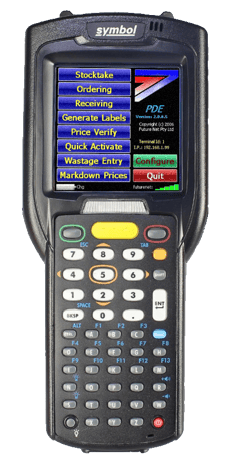
⚠️ Important: The Legacy PDE has been end of life since 2020. Contact Future Net support about upgrading to the new Native Android App.
2. Web-Based Application (WebPDE)
History
Released in 2019, the WebPDE replaced the legacy Symbol PDE program and was the first PDE application Future Net developed for Android devices.
While it allowed new features to be added and maintained configuration even when powered off, it occasionally exhibited stability issues in some stores network environments.
Visual Identifier
This PDE runs on Android devices, including the Honeywell EDA 51/52 supplied by Future Net Australia, as well as other devices such as the Zebra TC51/52 and Datalogic Memor 11/12.
The software runs in a web browser and features a white menu with either light blue or light orange menu options.
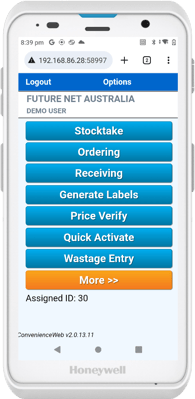
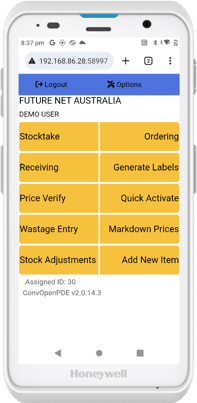
3. New Native Android App (Convenience PDE)
Released at the start of 2026, the new Convenience PDE app is the first new software released under the new management at Future Net Australia.
Developed as a native Android application, this app includes all the features you know and love from the WebPDE, but with a refreshed modern UI, enhanced stability, automatic updates, and automatic back office detection, to name a few.
The app features a direct link to a feedback form, giving users the ability to suggest new features and enhance the app even further. New features are added every couple of months.
Visual Identifier
Just like the WebPDE, this PDE runs on an Android device, ranging from Honeywell EDA 51/52 (supplied by Future Net Australia) to other devices such as Zebra TC51/52 and Datalogic Memor 11/12.
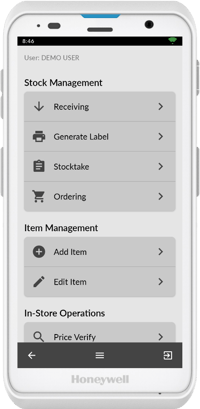
The software runs as a native Android app and has a refreshed UI, featuring a light grey menu with dark grey menu options.
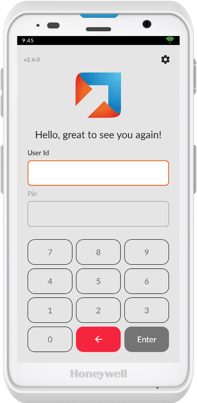
Still Not Sure?
If you're still unsure which version you have:
- Check if your device is a dedicated Symbol/Motorola scanner or a modern Android tablet/device
- Look for browser elements (address bar, back button) - if present, you're using WebPDE
- If it launches as a standalone app with no browser elements, you have the Native Android App
ℹ️ Need Help? Contact Future Net support at help.futurenet.com.au/support if you need assistance identifying your PDE version.